
Beyond the LLM: How Modern AI Code Assistants Really Work
FREEForget simple autocomplete; the true revolution in coding is moving from reactive AI assistance to proactive, autonomous collaboration. Google's Antigravity platform offers a glimpse into this future, where multi-agent systems independently refactor and test, making today's single-file–focused tools feel surprisingly limited.
👤 Who this article is for
Senior developers, tech leads, and engineering managers who have already tried tools like GitHub Copilot or Amazon Q Developer and want to understand what really separates "autocomplete on steroids" from true AI collaborators.
Is Your AI Code Assistant Doing More Than Just Autocomplete?

If you’ve used an AI code assistant in the last year, you’ve probably seen it as autocomplete on steroids. It finishes your lines, drafts boilerplate functions, and maybe even saves you a trip to Stack Overflow. And you’re not alone—Gartner predicts that by 2028, a staggering 75% of enterprise software engineers will use AI code assistants, up from less than 10% in early 2023. The adoption is massive, but it begs the question: is faster typing the real revolution here?
Frankly, no. Thinking of these tools as just autocomplete undersells their current power and completely misses where the industry is heading. Modern assistants from Microsoft, Amazon, and others already do more than complete lines. They can generate entire data validation modules from a single comment, suggest unit tests that uncover subtle race conditions, and help untangle legacy code. They're not just making you type faster; they're automating routine cognitive tasks.
The first time I used an assistant on a large monorepo, it happily suggested imports from the wrong microservice and called deprecated functions that our team had retired months earlier. It was fast, but it was also blind.
And that’s the wall every developer eventually hits: these tools are fundamentally reactive. They wait for you to type something, highlight a block of code, or ask a question. An assistant might suggest an optimization for a single function, but it will never proactively analyze your entire repository and recommend refactoring your caching layer to solve a systemic performance bottleneck. This limitation is why some developers report negligible time savings—the AI is helping with the small stuff but is blind to the big picture.
Key takeaway: The ceiling for current AI assistants isn't the power of the language model; it's their reactive architecture. They are helpers, not partners, and lack the context to solve problems you haven't already identified.
Beyond the LLM: What Core Architectures Power Modern AI Code Assistants?
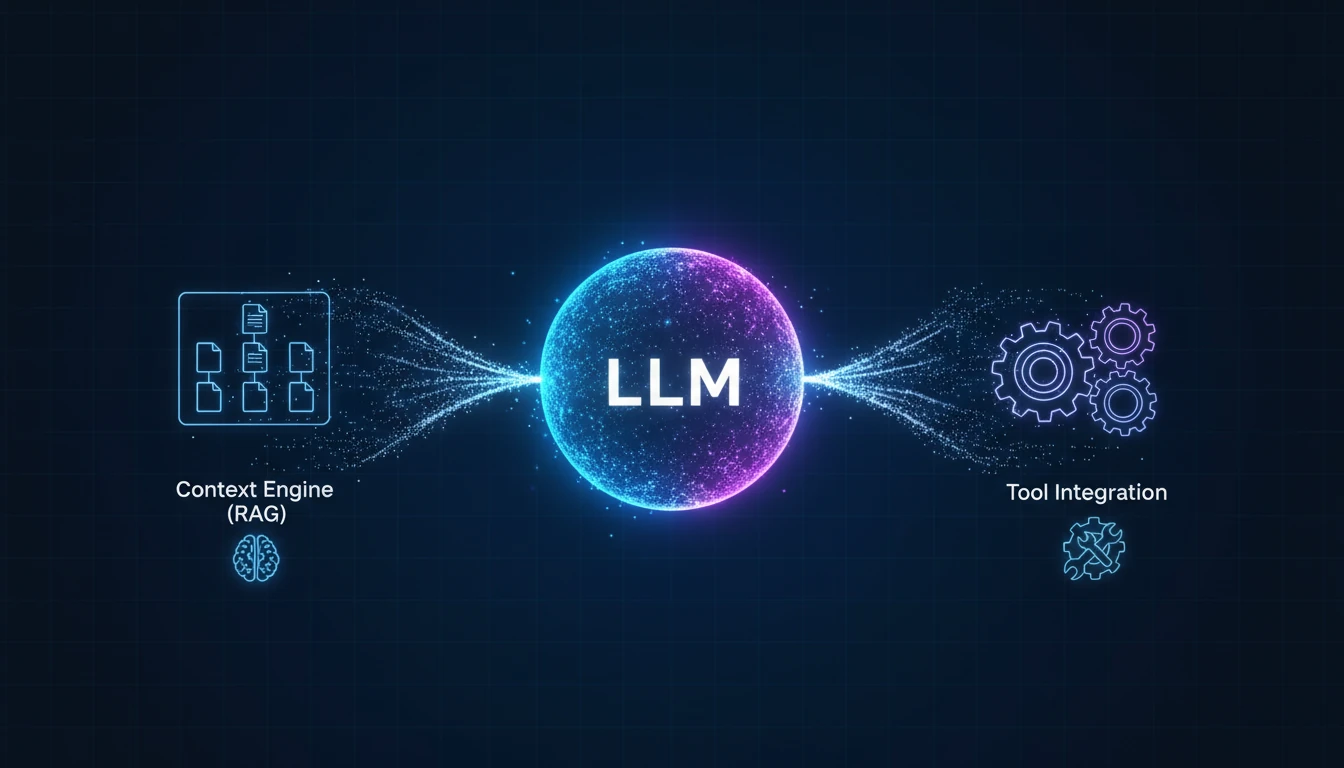
The inconsistency where an AI assistant generates a perfect algorithm yet suggests a function that ignores your project architecture isn't a bug; it's a design feature. A common misconception is viewing tools like GitHub Copilot as monolithic, all-knowing brains. They’re not. A truly useful assistant is a sophisticated system built on several architectural pillars, not just a powerful Large Language Model (LLM).
Though LLMs dominate headlines, the real differentiator between basic autocomplete and a collaborator lies in the scaffolding around the model.
The system behind the suggestions
Modern assistants orchestrate at least three core components to provide relevant, high-quality code:
The LLM engine
This is the part you're familiar with—a model like OpenAI's Codex or a Gemini variant trained on a massive corpus of code. It’s a powerful pattern-matcher and text generator, but without context, it’s just guessing what you want next.The context engine (RAG)
This is the game-changer. Using Retrieval-Augmented Generation (RAG), the assistant treats your entire codebase like a searchable, private database. When you ask it to modify a controller, it doesn't just look at the open file. It retrieves relevant definitions from your models, utility functions, and API schemas across the project. This is how tools like Amazon Q Developer can perform multi-file changes—they see the whole picture, not just a single canvas.Tool & service integrations
The smartest assistants don’t work alone. They integrate with other tools in your environment. For instance, an LLM might generate a code snippet, but a separate, specialized process might immediately run a linter or static analysis check on it, flagging a potential security flaw before the code ever lands in your editor. This simple collaboration is the primitive ancestor of the more advanced multi-agent systems we're starting to see.
This modular design represents a critical shift from code generation to system-level reasoning.
A simple spectrum: plugin vs assistant vs collaborator
You can think of today’s tools along a spectrum:
| Type of tool | Context scope | Actions & tools | Validation | Autonomy level |
|---|---|---|---|---|
| Raw LLM in your editor | Current file, maybe buffer | Suggests code only | None | Reactive helper |
| Modern assistant (Copilot, Q, etc.) | Multi-file / project-level | Editor + repo search + basic tests / linters | Limited, on demand | Guided collaborator |
| Multi-agent system (Antigravity-like) | Whole codebase + tooling | Orchestrates agents, runs pipelines end-to-end | Built-in into workflow | Autonomous collaborator |
Key takeaway: The capability of an AI assistant is defined more by its architecture—how it manages context and integrates tools—than by the raw power of its underlying LLM. This system-level thinking is the foundation for the next leap: truly autonomous AI collaborators.
How Google's Antigravity Ushers in the Autonomous AI Collaborator Era

Today's “super-powered autocomplete” assistants represent yesterday's technology. The real paradigm shift is less about smarter suggestions and more about transforming the developer's role from code writer to system manager. Google's internal Antigravity platform, powered by its Gemini models, offers one of the clearest glimpses into this future, embodying the move from a reactive assistant to an autonomous collaborator.
Unlike tools that operate within a single file, Antigravity functions as a coordinated team of AI agents. It's not one monolithic model trying to guess the next line of code. Instead, it deploys specialized agents for distinct tasks like analysis, refactoring, and testing, allowing it to tackle project-wide initiatives without constant human prompting.
From suggestions to autonomous execution
Imagine you need to migrate a deprecated API used across 50 different microservices—a task that could take a team weeks of tedious, error-prone work. A standard AI assistant might help you with the syntax in each file you open, but the cognitive load of tracking the entire change remains on you.
This is where Antigravity’s multi-agent system changes the game:
- An analyzer agent scans the entire codebase, identifies every instance of the deprecated API, and maps out the dependencies.
- A refactoring agent takes this plan and generates the necessary code changes across all 50 files, ensuring consistency and adherence to architectural best practices.
- A testing agent then autonomously writes and executes a new suite of integration tests to verify that the migration was successful and introduced no regressions.
This workflow exemplifies autonomous execution, not mere assistance. When a system can independently manage a multi-week refactoring project, single-file assistants become an obvious bottleneck.
It’s reasonable to expect that, if multi-agent architectures like this keep maturing, today’s single-file–focused assistants will feel increasingly obsolete over the next few years—not because the models are weak, but because the surrounding systems are.
Key takeaway: The paradigm is shifting from human-driven AI assistance to AI-driven, human-supervised software development. The goal is no longer to help you write code faster but to manage entire development lifecycle tasks for you.
What Practical Workflows Do Multi-Agent AI Code Assistants Unlock?

With autonomous multi-agent systems, the developer's role transitions from writing code to directing an engineering orchestra—a fundamental shift from line-by-line contribution to high-level architectural oversight and review.
Imagine you need to refactor a core library. Instead of spending days manually updating dependencies and running tests, you assign the task to an AI agent team. Your new workflow looks like this:
Define the goal
You issue a high-level command:“Refactor the
payment-processinglibrary to use the new async API, ensuring full backward compatibility and no performance degradation.”Set constraints
You specify architectural boundaries—what services the agents can and cannot touch.Review the plan
The agents present a multi-step plan, including which files will be modified and the testing strategy.Validate the result
You review a single, comprehensive pull request generated by the agents, complete with test results and performance benchmarks.
This proactive paradigm extends to maintenance tasks. An agent could be permanently tasked with autonomous bug fixing, scanning the codebase for potential N+1 query issues. When it finds one, it autonomously generates an optimized query, runs a benchmark to prove the improvement, and proposes a PR for your approval. Entire categories of technical debt become delegable work, not side projects.
Key takeaway: The most significant workflow change is the shift from writing code to defining outcomes. Your primary input becomes architectural guidance and validation, transforming your role into a manager of the software development lifecycle itself.
How Can Engineering Teams Evaluate a True AI Code Assistant?

As AI code assistants move from experiments to standard tooling, choosing the right one becomes a strategic decision, not just a personal preference. Legacy metrics like “lines of code generated” are dangerously misleading. To identify a true collaborator beyond smarter autocomplete, teams must ask better questions.
Instead of measuring speed, start measuring autonomy. Here are three practical tests to separate the hype from the helpful:
Test for architectural scope, not local suggestions
Give the AI a task that spans your repository, like refactoring a core dependency used across ten different services. A simple assistant will get lost or make isolated, incorrect changes. An autonomous collaborator will understand the architectural boundaries and execute the changes correctly.Test for proactive diagnosis, not reactive fixes
Introduce a known, complex bug into your codebase. A basic tool might offer a localized patch that addresses a symptom. A true collaborator should diagnose the root cause across different modules and propose a comprehensive, system-wide solution.Test for self-validation, not just code generation
Ask the assistant to implement a new feature, like a payment gateway API. A genuine collaborator won’t just write the function; it will also generate the unit, integration, and security tests required to prove its solution is robust and reliable. It takes ownership.
These are the kinds of tests I now consider the minimum before taking any “AI assistant” seriously in a production codebase.
Key takeaway: The best AI code assistants don't just write code faster. They understand your architecture, solve complex problems independently, and validate their own work. Stop measuring autocomplete; start measuring autonomy.
What you can do next week
If you want to turn this from theory into practice, here’s a simple Monday-morning playbook:
Run the three tests
Pick your current assistant (or one you’re trialing) and run the scope, diagnosis, and self-validation tests on a real service in your stack.Ask vendors the architecture questions
When evaluating tools, ask:“How do you build context?”, “Which tools can your assistant call?”, “How do you validate changes end-to-end?”
Choose one workflow to delegate
Start small: for example, “update a shared library across three services with tests”. Treat it as a pilot for moving from helper → collaborator.
References
- Google Launches Gemini 3 with Antigravity Platform for Multi-Agent AI Coding (AI Agent Store) - https://aiagentstore.ai/ai-agent-news/topic/coding/2025-11-25
- 10 Best AI Coding Assistant Tools in 2025 (Mor Software Blog) - https://morsoftware.com/blog/ai-coding-assistant-tools
- Best AI Coding Assistants as of November 2025 (Shakudo Blog) - https://www.shakudo.io/blog/best-ai-coding-assistants
- How AI Code Assistants Can Save 1,000 Years of Developer Time (DevOps.com) - https://devops.com/how-ai-code-assistants-can-save-1000-years-of-developer-time/
- AI Coding Assistants Don't Save Much Time, Says Software Engineer (The Register) - https://www.theregister.com/2025/11/14/ai_and_the_software_engineer/
- Windsurf: The AI-First Code Editor Revolutionizing Developer Productivity (Shuttle.dev Blog) - https://www.shuttle.dev/blog/2025/11/20/ai-coding-tools-for-developers